Kraftig ydeevne
Vi har kraftige dedikerede servere baseret på AMD's Ryzen-serie.

Start your own Minecraft server today with powerful performance and reliable support located here in Norway. Perfect for private servers and large community servers alike, whether you're Team Java or Team Bedrock Edition!
Minecraft
Minecraft may be one of the most timeless games ever created, with something for players of all ages. With your own dedicated Minecraft server, gaming with friends becomes even better. Because what's better than a lightning-fast Minecraft server?
Whether you're building impressive redstone contraptions, creating amazing builds, playing survival, or exploring modpacks, a reliable and affordable Minecraft server in Norway could be exactly what you're looking for.
Fordi vi leverer kraftige servere til en uovertruffen pris.
Vi har kraftige dedikerede servere baseret på AMD's Ryzen-serie.
Vores netudbyder leverer kraftig DDoS-beskyttelse 24/7
Sikr dine serverfiler med backups, som du nemt kan sætte op automatisk i spilpanelet!
Kun det bedste er godt nok til gaming, derfor kører alle spilservere kun på NVMe m.2 SSD'er.
Nem adgang til alle filer, der skal bruges til serveren. Upload eller download de filer, du har brug for, når du har brug for dem.
Serveren starter installationen umiddelbart efter, at betalingen er gennemført.
Serverne er strategisk placeret centralt på Østlandet i Norge, for stabil forbindelse fra hele Norge og resten af Europa.
Hvem vil binde sig i lang tid, når man ikke ved, om serveren skal bruges i 1 uge eller 5 måneder mere? Afslut når som helst, så har du serveren resten af den betalte periode.
Finder du en bedre deal? Sig til, så matcher vi den måske!
Vælg hvilken servertype du ønsker, modded eller vanilla, og få den installeret med det samme.
Vælg mellem:
30%
Bestil for en længere periode og få op til 30% rabat på allerede vanvittigt lave priser!
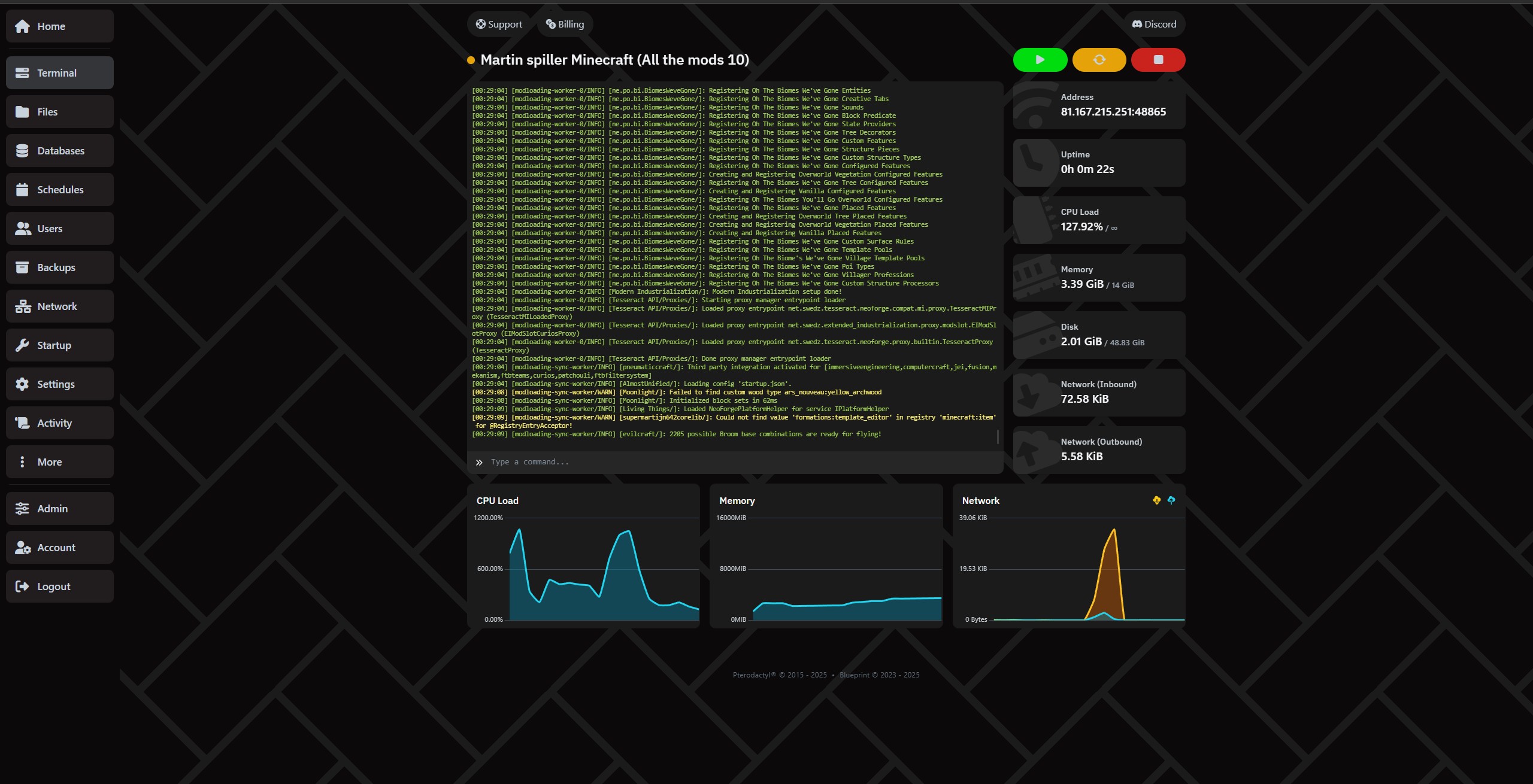
Administrer serveren supernemt via vores kontrolpanel.
Flyt filer med SFTP nemt under settings.
Har du givet venner adgang? Se alt, der er sket med serveren, under "Activity"
Lav fulde backups under fanen Backups!
Sæt automatisk backup og sletning af backups op under Schedule, så er du sikker på at have et waypoint at gå tilbage til!
Opret, slet og administrer databaser nemt under fanen "Databases".
Det afhænger helt af behov og antal spillere. Plugins eller modpacks kan også øge behovet for RAM betydeligt. Har du brug for hjælp, kan du altid kontakte os!
Vores anbefalinger til RAM:
Generelt anbefaler vi intet under 4GB, medmindre du skal køre en proxyserver.
Vanilla: Hvor mange GB RAM du har brug for, afhænger af hvor mange spillere og hvor stor en verden du ønsker. Det kan være smart at starte på 4GB og kun 100% CPU og se udviklingen.
Paper: (Til plugins) - Paper kræver minimum 4GB, men Paper anbefaler minimum 6-10GB. Vi anbefaler 200% CPU og 8GB eller mere. Læs mere om Paper på deres egne sider.
Forge: (Mod loader/mod packs) - Forge behøver ikke nødvendigvis meget RAM, da nogle pakker og mods kører fint på lidt, men generelt anbefaler vi at starte på 6GB eller 8GB og 200% og se, hvor meget de mods/modpacks, du installerer, bruger. Læs mere om Forge på deres egne sider.
Neo Forge: (Mod loader/mod packs) - Neo Forge behøver ikke nødvendigvis meget RAM, da nogle pakker og mods kører fint på lidt, men generelt anbefaler vi at starte på 6GB eller 8GB og 200% og se, hvor meget de mods/modpacks, du installerer, bruger. Læs mere om Neo Forge på deres egne sider.
Fabric: (Modpack) - Vores anbefaling er at starte på minimum 6GB og 200% CPU og så se, hvordan tingene udvikler sig. Læs mere om Fabric på deres egne sider.
Folia: (Plugins) - Vores anbefaling er at starte på 16GB og 400% CPU og se, hvordan tingene udvikler sig. Nogle klarer sig med mindre, mens andre har brug for meget mere. Alt afhænger af, hvilke plugins du vælger. NB: Det er ikke givet, at de plugins, du ønsker, understøtter Folia. Du kan læse mere om Folia på deres egne sider.
Velocity: (Proxy) - De, der skal have proxy, kender garanteret det meste. Vi anbefaler at starte med 1GB RAM og 200% CPU og se, hvad du faktisk bruger. Læs mere om Velocity på deres egne sider.
Bungeecord: (Proxy) - De, der skal have proxy, kender garanteret det meste. Vi anbefaler at starte med 1GB RAM og 200% CPU og se, hvad du faktisk bruger. Læs mere om Velocity på deres egne sider.
Ja. Du kan selv uploade filer via filhåndteringen eller FTP, eller bruge vores automatiske installer for at spare tid.
Serveren er klar få minutter efter bestilling.
Vi har DDoS-beskyttelse, og du har mulighed for at sætte daglige backups op, så du altid kan gendanne.
Ja. Du kan opgradere eller nedgradere når som helst helt uden binding.
Playing Minecraft together with friends is an experience that never gets old. But if you've ever tried running a server directly from your own PC, you know how quickly it can become unstable, demanding on your hardware, and disruptive to your own gaming experience. Not to mention the downtime when your PC finally deserves a well-earned rest.
The solution? Minecraft server hosting in Norway – a reliable, fast and user-friendly way to create your own Minecraft world.
With Proservere, you get a dedicated Minecraft server in Norway with a strong network connection, lightning-fast NVMe storage and all the features you need for a smooth gaming experience.
Whether you want to play with a few friends or build a large community, our servers are built with performance, stability and freedom in mind.
There are plenty of Minecraft server hosting providers located abroad. But if you want the best possible gaming experience in Norway, the answer is simple: choose a server that is actually located in Norway.
Having your server closer to your players can significantly reduce the response time between your computer and the server, measured in milliseconds (ms), commonly known as ping.
With a Minecraft server in Norway, you can avoid unnecessary latency caused by your connection having to travel through servers and network infrastructure in other countries.
Lower ping means data can travel between your computer and the server faster. This is particularly important for responsive PvP gameplay, fast interactions and smooth redstone machines.
For Norwegian players, choosing Minecraft hosting in Norway means your server is located close to where you actually play.
Your server comes with DDoS protection, the ability to configure automatic daily backups, and an integrated file manager that makes it easy to manage your server.
You don't have to worry about a network attack or configuration mistake destroying everything you've built, especially when you follow our helpful guides and backup recommendations.
We know that the Minecraft community can be spontaneous. That's why your Minecraft server is ready within just a few minutes.
You can literally create a new world and start playing with your friends the same day.
And if you ever decide to take a break, there is no long-term commitment. You only pay for the period and server package you choose.
When we say we offer affordable Minecraft server hosting in Norway, it's not just about the price – although we're very competitive there. It's about how much value you get included with your server.
Minecraft server hosting simply means renting a server that runs Minecraft for you and your friends.
Instead of using your own computer to host the game, a hosting provider runs the server for you in a professional data centre. This allows your server to stay online without requiring your personal PC to be running.
One of the biggest reasons players choose our Minecraft hosting is our automatic modpack and plugin installer.
You don't need to spend hours downloading files, moving folders or figuring out complicated installations. Choose what you want to install and let the panel handle the setup.
Want to try RLCraft, SkyFactory or Pixelmon?
Normally, installing modpacks can involve manual downloads, configuration and plenty of file management. With Proservere, the process is automated.
Choose your modpack, click install, and your Minecraft server will be ready to configure and play.
Want to add Essentials, WorldEdit or an economy system to your server?
Install plugins directly through the server panel without having to manually upload everything yourself. You can then configure the plugin files to suit your own server and gameplay.
The result: more time playing Minecraft and less time dealing with technical problems.
Choosing Minecraft server hosting in Norway from Proservere means you get:
Whether you're playing Minecraft for fun with a few friends or building a large community, we're ready to host your world.
Order your own Minecraft server in Norway today and play Minecraft your way!
Tal med holdet og fællesskabet, hurtig hjælp og gode tips.
We use necessary cookies to make this website work. With your permission, we also use cookies for preferences, analytics and marketing. You can refuse optional cookies or change your choices at any time.
Global Privacy Control is active. Marketing is disabled.
Den Europæiske Union / EØS · GDPR / ePrivacy