Powerful Performance
We have powerful dedicated servers based on AMD's Ryzen series.

Start your own Minecraft server today with powerful performance and reliable support located here in Norway. Perfect for private servers and large community servers alike, whether you're Team Java or Team Bedrock Edition!
Minecraft
Minecraft may be one of the most timeless games ever created, with something for players of all ages. With your own dedicated Minecraft server, gaming with friends becomes even better. Because what's better than a lightning-fast Minecraft server?
Whether you're building impressive redstone contraptions, creating amazing builds, playing survival, or exploring modpacks, a reliable and affordable Minecraft server in Norway could be exactly what you're looking for.
Because we deliver powerful servers at an unbeatable price.
We have powerful dedicated servers based on AMD's Ryzen series.
Our network provider delivers powerful DDoS protection 24/7
Secure your server files with backups that you can easily set up automatically in the game panel!
Only the best is good enough for gaming, which is why all game servers run exclusively on NVMe m.2 SSDs.
Easy access to all the files you need to use the server. Upload or download the files you need, when you need them.
The server starts the installation process immediately after payment is completed.
The servers are strategically located in Eastern Norway, for a stable connection from all over the Kingdom of Norway and the rest of Europe.
Who wants to be tied down for a long time when you don't know if the server will be used for 1 week or 5 more months? Cancel at any time, and you keep the server for the rest of the paid period.
Found a better deal? Let us know, and maybe we will match it!
Choose the server type you want, whether modded or vanilla, and get it installed instantly.
Choose between:
30%
Order for a longer period and get up to 30% off already ridiculously low prices!
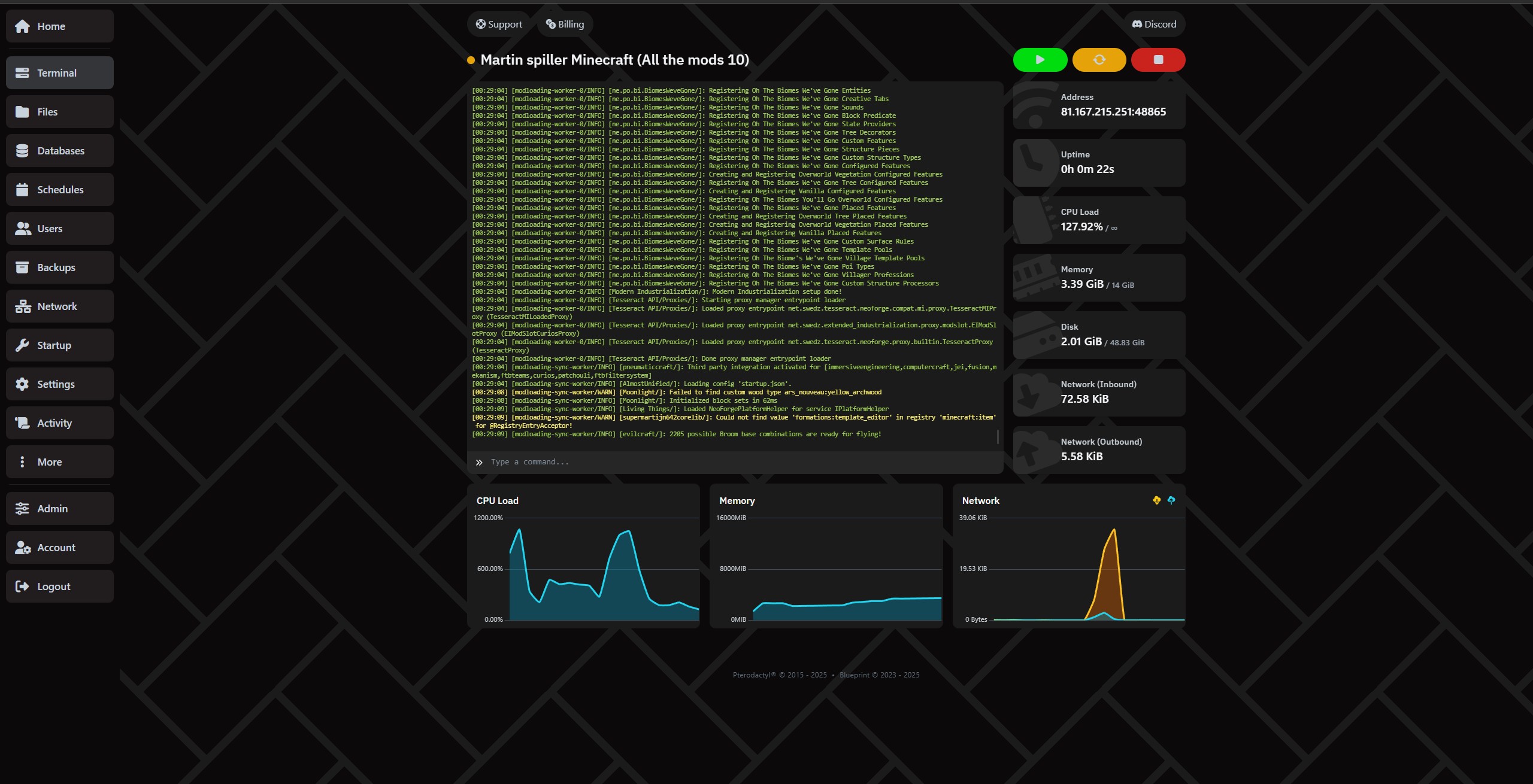
Manage your server super easily through our control panel.
Easily move files with SFTP under settings.
Have you given access to friends? See everything that has happened to the server under "Activity"
Create full backups under the Backups tab!
Set up automatic backups and deletion of backups under Schedule, so you are sure to have a waypoint to go back to!
Set up, delete and manage databases easily under the "Databases" tab.
It depends entirely on your needs and the number of players. Plugins or modpacks can also increase the need for RAM considerably. If you need help, you can always contact us!
Our RAM recommendations:
In general we recommend nothing under 4GB, unless you are running a Proxy server.
Vanilla: How many GB of RAM you need depends on how many players and how large a world you want. It can be smart to start at 4GB and only 100% CPU, and watch how it develops.
Paper: (For plugins) - Paper requires a minimum of 4GB, but Paper recommends a minimum of 6-10GB. We recommend 200% CPU and 8GB or more. Read more about Paper on their own pages.
Forge: (Mod loader/mod packs) - Forge does not necessarily need a lot of RAM, as some packs and mods run fine on little, but in general we recommend starting at 6GB or 8GB and 200%, and seeing how much the mods/modpacks you install use. Read more about Forge on their own pages.
Neo Forge: (Mod loader/mod packs) - Neo Forge does not necessarily need a lot of RAM, as some packs and mods run fine on little, but in general we recommend starting at 6GB or 8GB and 200%, and seeing how much the mods/modpacks you install use. Read more about Neo Forge on their own pages.
Fabric: (Modpack) - Our recommendation is to start at a minimum of 6GB and 200% CPU, and then see how things develop. Read more about Fabric on their own pages.
Folia: (Plugins) - Our recommendation is to start at 16GB and 400% CPU, and see how things develop. Some manage with less, while others need much more. It all depends on which plugins you choose. NB: It is not a given that the plugins you want support Folia. You can read more about Folia on their own pages.
Velocity: (Proxy) - Those who need a proxy surely know most of this already. We recommend starting with 1GB RAM and 200% CPU, and seeing what you actually use. Read more about Velocity on their own pages.
Bungeecord: (Proxy) - Those who need a proxy surely know most of this already. We recommend starting with 1GB RAM and 200% CPU, and seeing what you actually use. Read more about Velocity on their own pages.
Yes. You can upload files yourself via the file manager or FTP, or use our automatic installer to save time.
The server is ready a few minutes after ordering.
We have DDoS protection and you have the option to set up daily backups, so you can always restore.
Yes. You can upgrade or downgrade at any time, completely without commitment.
Playing Minecraft together with friends is an experience that never gets old. But if you've ever tried running a server directly from your own PC, you know how quickly it can become unstable, demanding on your hardware, and disruptive to your own gaming experience. Not to mention the downtime when your PC finally deserves a well-earned rest.
The solution? Minecraft server hosting in Norway – a reliable, fast and user-friendly way to create your own Minecraft world.
With Proservere, you get a dedicated Minecraft server in Norway with a strong network connection, lightning-fast NVMe storage and all the features you need for a smooth gaming experience.
Whether you want to play with a few friends or build a large community, our servers are built with performance, stability and freedom in mind.
There are plenty of Minecraft server hosting providers located abroad. But if you want the best possible gaming experience in Norway, the answer is simple: choose a server that is actually located in Norway.
Having your server closer to your players can significantly reduce the response time between your computer and the server, measured in milliseconds (ms), commonly known as ping.
With a Minecraft server in Norway, you can avoid unnecessary latency caused by your connection having to travel through servers and network infrastructure in other countries.
Lower ping means data can travel between your computer and the server faster. This is particularly important for responsive PvP gameplay, fast interactions and smooth redstone machines.
For Norwegian players, choosing Minecraft hosting in Norway means your server is located close to where you actually play.
Your server comes with DDoS protection, the ability to configure automatic daily backups, and an integrated file manager that makes it easy to manage your server.
You don't have to worry about a network attack or configuration mistake destroying everything you've built, especially when you follow our helpful guides and backup recommendations.
We know that the Minecraft community can be spontaneous. That's why your Minecraft server is ready within just a few minutes.
You can literally create a new world and start playing with your friends the same day.
And if you ever decide to take a break, there is no long-term commitment. You only pay for the period and server package you choose.
When we say we offer affordable Minecraft server hosting in Norway, it's not just about the price – although we're very competitive there. It's about how much value you get included with your server.
Minecraft server hosting simply means renting a server that runs Minecraft for you and your friends.
Instead of using your own computer to host the game, a hosting provider runs the server for you in a professional data centre. This allows your server to stay online without requiring your personal PC to be running.
One of the biggest reasons players choose our Minecraft hosting is our automatic modpack and plugin installer.
You don't need to spend hours downloading files, moving folders or figuring out complicated installations. Choose what you want to install and let the panel handle the setup.
Want to try RLCraft, SkyFactory or Pixelmon?
Normally, installing modpacks can involve manual downloads, configuration and plenty of file management. With Proservere, the process is automated.
Choose your modpack, click install, and your Minecraft server will be ready to configure and play.
Want to add Essentials, WorldEdit or an economy system to your server?
Install plugins directly through the server panel without having to manually upload everything yourself. You can then configure the plugin files to suit your own server and gameplay.
The result: more time playing Minecraft and less time dealing with technical problems.
Choosing Minecraft server hosting in Norway from Proservere means you get:
Whether you're playing Minecraft for fun with a few friends or building a large community, we're ready to host your world.
Order your own Minecraft server in Norway today and play Minecraft your way!
Talk to the team and the community, quick help and great tips.
We use necessary cookies to make this website work. With your permission, we also use cookies for preferences, analytics and marketing. You can refuse optional cookies or change your choices at any time.
Global Privacy Control is active. Marketing is disabled.
European Union / EEA · GDPR / ePrivacy